Poster Presentation Guidelines

Congratulations on being selected to present a poster at CampusEnergy2026!

This Poster Presenter Resource Page is your one-stop guide for everything you need to know, with important details on how to create and present your poster session, a truly unique opportunity to engage with attendees at the conference.

Please bookmark this page, as any important updates will be posted here. IDEA staff will also send brief email notices if there are major changes or additions to these guidelines.

A poster presentation allows you to showcase the full content of your presentation on a poster board while engaging in more informal, one-on-one conversations with attendees during designated viewing times. It’s a great way to dive deeper into your work, answer questions, and build lasting connections.

Like a podium presentation, your poster is content-heavy, spotlighting challenges (often through a case study or similar examples), and highlight key lessons learned, solutions, and takeaways.

Important Deadlines and Due Dates

Submit Signed Speaker Contract
Friday, April 10, 2026

Registration & Payment Deadline
Friday, April 17, 2026

PowerPoint Submission Deadline
Wednesday, May 20, 2026
(minor edits can be made to your presentation through Friday, June 5)

Prerecorded Video Submission Deadline
Friday, June 5, 2026


Quick Links

For your poster presentation, IDEA strongly recommends using the IDEA2026 Presentation Slide Template for both consistency and functionality (stating problem, evidence, case studies, lessons learned, conclusion). If you choose to use a different slide deck, please include the opening slide from the official template. If your poster is more of a designed piece (larger poster), you do not need to use this template.

Presentation Slide Template

Conference Logo

What Does a Poster Display Look Like?

All posters will be displayed in the exhibit hall area. A poster board will be provided for you onsite, corresponding the poster number assigned to you and listed in the conference program.

Poster board dimensions are 48” (h) x 94” (w). They are two-sided boards, one side of the board is used for your presentation, the other side will be used for another poster presenter.

IDEA will number the poster boards as they are listed in the app. Please choose the poster board that corresponds to the number given to your poster.

Mount your display on the display board surface as you see fit. The photo below is an example of the poster board area and a poster board. You can design your poster board as you like as long as it stays within the provided dimensions. IDEA will provide as many push-pins as you require.
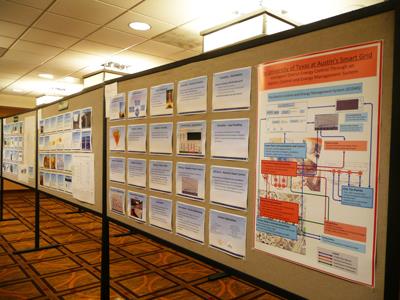

Poster Display - IDEA gives poster presenters the opportunity to decide how they would like to display their poster presentation. Many create a slide deck, print out the slides and pin them to the posterboard. Others create a large, professionally designed poster with content and vibrant visuals, or for many, a mix of both.

As posters are up for the entire program, whatever you think will make your content stand out is fine, as long as you can pin it to the posterboard. 

Printing - Please note that you are responsible for printing and transporting your poster materials to the event. IDEA will provide the poster boards and pushpins needed to mount your poster. 

If you have any questions between now and your presentation date, or need to update your session title or presenters, please contact Jason Beal or Emily Cummings at speakers.idea@districtenergy.org.

Submitting Your Deliverables: Conference Harvester


While the Poster Session Resource Page provides helpful hints and guidance on how to make your presentation a success, Conference Harvester is our online platform used to gather key session information, including the upload of your conference slides and session prerecord, along with editing your bio, abstract, and profile photo. The information you upload/edit into Conference Harvester will also be published in the conference app, website and onsite conference print program.

Login instructions for Conference Harvester were included in your acceptance email. If you’re having trouble accessing the system, please reach out to us at speakers.idea@districtenergy.org and we’ll be happy to help.
 
Session title and speaker changes in Harvester
If you need to make any changes to your session title or presenter information, please contact IDEA directly. While many fields in Conference Harvester are editable by presenters (bio, abstract, profile photo), session title and presenter updates need to be made by our team.

Also, if a member of your team will be assisting with the preparation or delivery of your presentation and need access to Conference Harvester, please contact us. We can add them as a 'helper' to your account, giving them permission to upload or edit materials on your behalf.

Creating Your Poster Presentation

As you begin to create your presentation, a few very important things to consider.

Content Requirements:

  • Case studies and project data must be included. Please present technologies, equipment, tools, etc. within the context/application of a case study/project.
  • NO COMMERCIAL CONTENT ALLOWED (e.g. equipment/product cut sheets, product catalogs, company profiles, “About Us/Why We're the Best” slides, marketing slides). Presentations submitted with blatant commercial content will be rejected. 
  • Bios/Photo. Speaker photos and bios will be made available on the IDEA2026 website and event app, but you can include a brief slide with name/photo/title.
  • No comparisons to other vendors’ and/or competitors’ products.

PowerPoint Format Requirements:

If you decide to create your poster in PPT, we recommend the following:

  • IDEA recommends using the IDEA2026 PowerPoint Template for your presentation. While you are not required to use it, please follow the structure (problem, case studies, solutions conclusions) as it does map out the flow of the presentation. 
  • Whether you use the template or not, we ask that your presentation slides begin with the first slide in the template deck (the slide including the meeting image).
  • PPT should be in 16:9 widescreen presentation ratio.
  • Font size on slides should be no smaller than 25 pt.
  • Slide content must be presented and written in English.
  • Recommended Slide Order
    • The first slide in the template should be the first slide in all presentations.
    • The second slide should include your presentation title, company name(s) and logo(s), and name of the speaker(s)
    • One or more slides introducing the problem
    • Solution slides featuring a Case Study/Project
    • Lessons Learned
    • A “Q&A” Slide (see second-to-last slide in attached PPT file)
    • Thank You Slide with company logo, speaker name(s) and contact info

If your poster is created using design software or is a singular poster, we still recommend the slide order and content suggestions above. 

Uploading Your Presentation

Two key deliverables for your presentation are uploading your poster presentation materials and prerecorded video (.mp4) of your session (typically a recording of a Zoom or Teams call between presenters or the recording function in PPT).

As a poster presenter, you are required to submit your poster materials for review by IDEA by Wednesday, May 20, 2026. A  PDF of your poster will be automatically created upon upload of your files and will be included in the conference app for attendees to view and takes notes on. 

After submitting your poster materials, IDEA will review for content and get back to you ASAP with edits (if any). Once approved, you are free to create the prerecorded video of your presentation.

The prerecorded presentation is required, designed to increase your visibility with attendees. The prerecorded video is a way for attendees to see what they missed post-show.

The video is due on Friday, June 5, along with any final edits to your poster materials.

Please do not send your presentation files  or videos to us directly - they must be submitted through Conference Harvester.

Prerecorded Video Basics 

The prerecorded video is made available to all registered attendees post-event in the IDEA Learning Center, giving attendees who missed your poster session the opportunity to view it. This will greatly increase your visibility with attendees post-conference.

Recording your video is not a Spielbergian production - simply record a Zoom or Teams call with screen share, video and audio and that will suffice. If you're presenting solo, Microsoft PPT has a record feature that can be used as well.

Over 1000 presenters have successfully produced session recordings over the past six years for IDEA conferences, often finding it a helpful ‘dry run’ for their presentation.

Deadline to Submit, Friday, June 5, 2026

Please note: Do not record your video until IDEA has approved your presentation slides. Once your presentation materials and/or slides are uploaded, they will be reviewed and (barring any issues with content) approved by IDEA ASAP.

Need help recording your video? Contact us at speakers.idea@districtenergy.org.

Poster Session Hours

This year's poster presentations will be held in the IDEA Exhibit Hall. Posters will be near prime real estate (food & beverage) and will be promoted often during the conference in the app.

Your poster will be up the entire conference, but there are dedicated times, listed below (during exclusive exhibit hall hours) where we ask you to be near your poster to discuss your topic with interested parties. We do ask that you place a business card on your poster in case someone wants to reach out (though they can also reach out to you using the app).

Tuesday, June 23

Poster Presentation Set-up - 12:00-4:00pm

Poster Presentations during Opening Reception in the Exhibit Hall - 4:15-5:45pm

Wednesday, June 24

7:00-7:50am (during breakfast)

10:15-10:55am (during refreshment break)

2:00-2:40pm (during dessert and coffee break in exhibit hall)

3:45-4:25pm (during afternoon refreshment break in exhibit hall)

5:30-6:45pm (during cocktail reception in exhibit hall)

Thursday, June 25

7:00-7:50am (during breakfast in the exhibit hall)

10:00-10:40am (refreshment break in exhibit hall)

1:45-2:25pm (dessert and coffee and raffle drawing in the hall)

Poster teardown is immediately following the 2:25pm break. Posters not taken down within 60 minutes of hall closing will be discarded.